

PII viewer
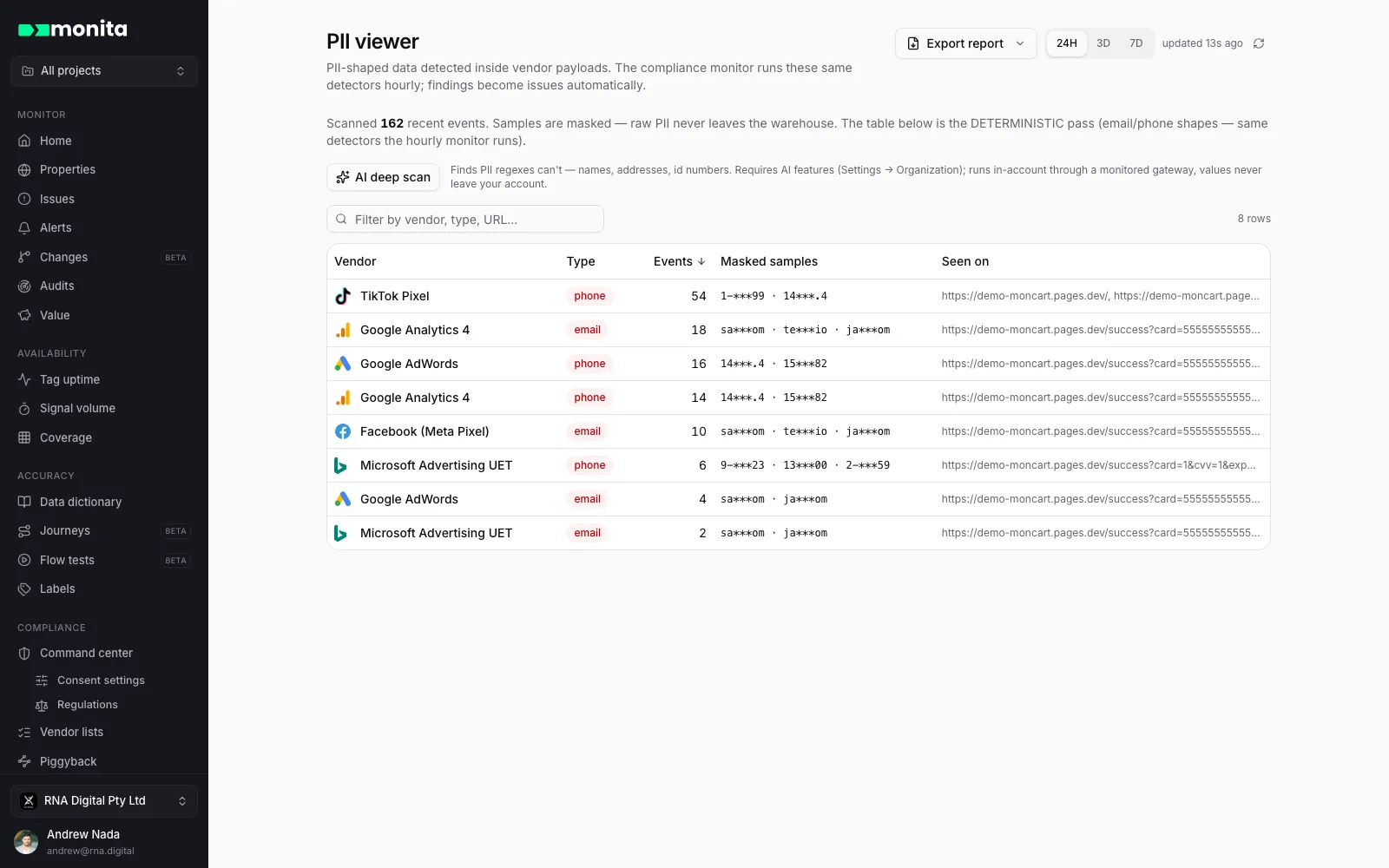
The PII viewer (app.monita.ai/compliance/pii) gives you a single, near-realtime view of any personally identifiable information (PII) Monita has detected leaving your site or app and reaching your marketing, analytics and ad-tech vendors.
It answers two questions at a glance:
- Are we leaking PII to any of our vendors?
- Which vendors, events and fields are involved?
How Monita handles detected PII
Section titled “How Monita handles detected PII”Monita is built privacy-first. Raw PII values observed in your traffic are never stored. When PII is detected in a request leaving your site:
- The original value is immediately replaced with a SHA-256 hash, in flight, before anything is stored.
- A PII-type label (e.g.
email) is attached so the detection can be surfaced in the viewer. - The hashed record is retained so you can still see the vendor, event, field name and volume of leaks without ever exposing the underlying value.
What you see
Section titled “What you see”- Summary — distinct PII data points detected in the selected window, by property, PII type and the vendors involved.
- Detailed breakdown — a row per detection: the property it originated from, the vendor it was sent to, the PII type, the event it rode on, the payload field that carried it (e.g.
ep.email,u1), the value hash, and how often it was seen.
Filter by property and vendor, and adjust the time window with the controls at the top of the page.
What types of PII does Monita detect?
Section titled “What types of PII does Monita detect?”Monita continuously scans monitored requests for the following:
| PII type | Notes |
|---|---|
| Email address | Detected by format — works regardless of the field name. |
| Credit card number | Visa, Mastercard, Amex and Discover. Validated with the Luhn checksum to virtually eliminate false positives from random digit sequences. |
| US Social Security Number | Excludes known-invalid ranges. Requires a relevant field name (e.g. ssn, social, tax, tin) to confirm intent. |
| US mobile number | Supports the optional +1 country code. Requires a relevant field name (e.g. phone, mobile, cell, tel, contact, sms). |
| Australian mobile number | Supports the 04xx format and the optional +61 country code. Requires a relevant field name as above. |
Out of scope (today)
Section titled “Out of scope (today)”To keep detection accuracy high, the following are not detected by the always-on scanners:
- Names, postal addresses, dates of birth
- Passport and driver’s licence numbers
- Phone numbers from countries other than the US and Australia
- PII buried inside long blocks of unstructured free text
The on-demand AI deep scan on the PII viewer page can find some of these (names, addresses, ID numbers) when AI features are enabled for your organization. If a category above is critical to your posture, contact support — coverage is continuously expanding.
From detection to notification
Section titled “From detection to notification”Detections always appear in the PII viewer, and the compliance monitor runs the same detectors continuously — its findings land in Issues alongside every other detection.
For targeted routing — a Slack ping the moment an email address reaches a specific vendor — create a Data Validation alert with a Contains email (or equivalent) operator:
- Open Alerts and create a New alert with type Data Validation.
- Pick the vendor(s) to watch (e.g. Meta Pixel, Google Ads).
- Under trigger conditions, choose the parameter to inspect and an operator like
Contains emailorContains credit card. - Optionally filter (e.g. only the
purchaseevent), then choose the destination — Slack, Teams or email — and save.
This is opt-in by design: organizations differ on which vendors may receive which fields, so you control exactly what triggers a notification.
Will Monita ever store the raw PII it detects?
No. Detected values are SHA-256 hashed in flight, before anything is stored. The raw value cannot be recovered — by you, by Monita, or by anyone else.
Why hash instead of dropping the value entirely?
Hashing preserves the ability to count unique users, de-duplicate, and trend leakage volumes over time — all without ever exposing the underlying value.
Why didn’t Monita flag a value I can see in the raw payload?
Detection is conservative by design — missing an edge case beats flooding the platform with false positives. Common reasons: the value is a type not yet covered (e.g. a name or address), the field name lacks a recognized keyword for ambiguous types like phones and SSNs, or the value is embedded in a larger free-text blob. Try the AI deep scan, or contact support with the specific case.
Can I be alerted automatically when PII is detected?
Yes — findings file into Issues, and a Data Validation alert with a Contains email (or similar) operator gives you direct, per-vendor notification the moment it happens.