

Vendor lists & piggyback
Two pages answer the governance questions auditors actually ask: which vendors touch our data, and who approved them? (Vendor lists) and who put that vendor on our site? (Piggyback).
Vendor lists
Section titled “Vendor lists”Vendor lists (app.monita.ai/compliance/vendors) is your data-governance register: every vendor observed in your traffic gets an explicit verdict.
| Verdict | What it means |
|---|---|
| Approved | Documented as sanctioned. Appears as expected in digests and reviews — your clean audit trail. |
| Blocked | Must not fire. If it does, the compliance monitor files a HIGH issue and it leads the digest — this is how you catch a rogue tag someone re-enabled. |
| Unreviewed | Observed in traffic but nobody has made a call. The goal is zero unreviewed vendors. |
The feature is enforcement, not bookkeeping: a blocked vendor that keeps firing is a violation — it’s flagged on the list, files compliance issues automatically, and marks the property’s standing on the Command center.
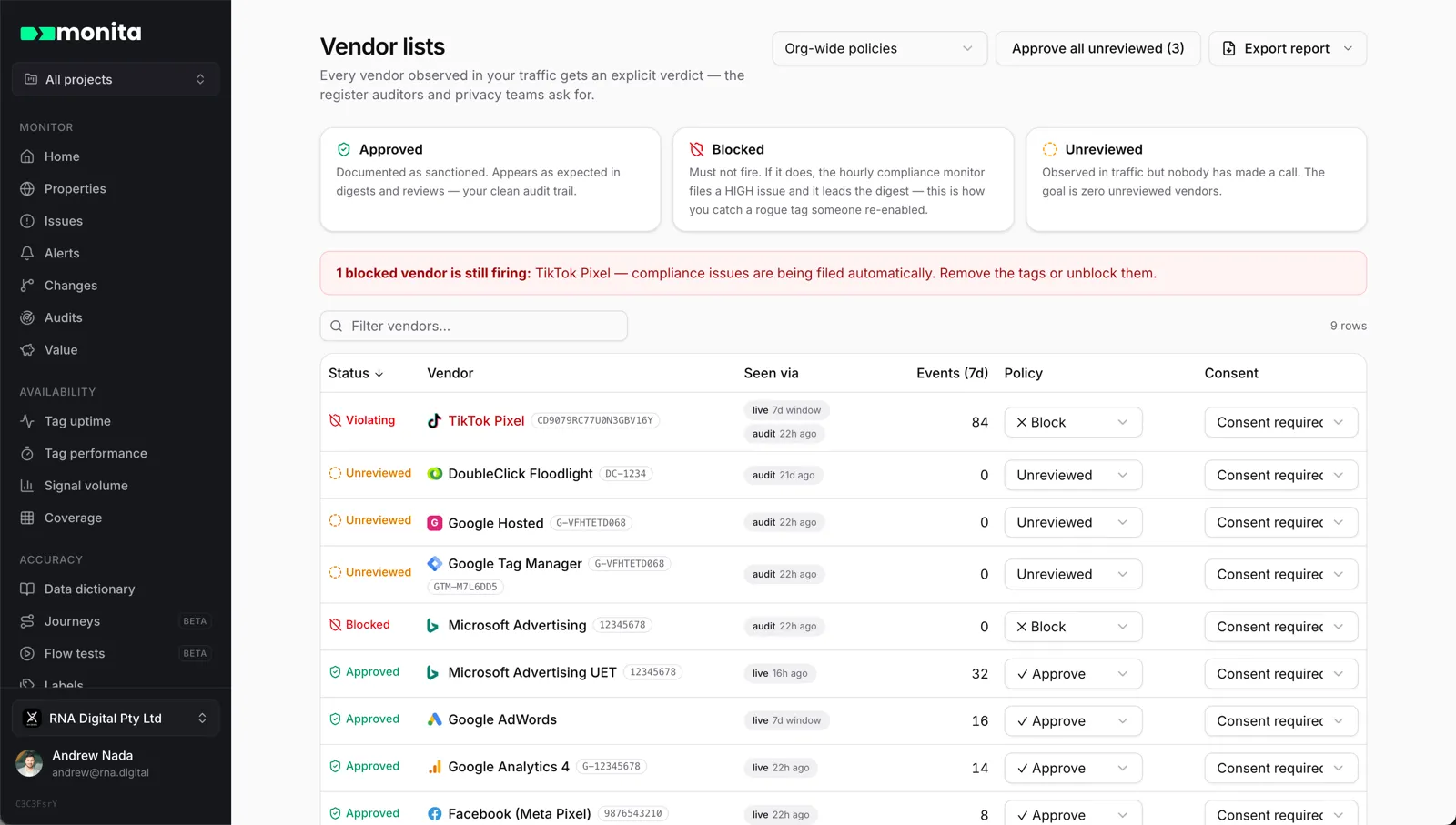
Each row also shows where the vendor was seen — two independent sources with their own last-seen times, because they legitimately disagree:
- Live — the vendor fired in real monitored traffic.
- Audit — the vendor executed when real browsers loaded your pages during an audit.
Consent expectation
Section titled “Consent expectation”Alongside the allow/block verdict, each row carries a consent expectation — how the compliance suite should read this vendor’s fires when consent is absent:
| Expectation | When to use it |
|---|---|
| Consent required (default) | The vendor must not fire without affirmative consent — a no-consent fire is flagged as a breach |
| Consent mode | The vendor fires anonymized without consent by design — e.g. Google Advanced Consent Mode, where pings are cookieless until consent is granted. Its fires get a consent mode badge instead of a breach flag |
| Exempt | Your organization accepts this vendor’s fires regardless of consent — e.g. an essential business partner. Its fires get a grey exempt badge |
Pick it from the dropdown on the vendor’s row. The setting drives how the vendor reads on the Command center consent-by-vendor table — counts stay visible in every case, only the labelling changes. Full detail, including how to set it via the API or MCP, is in Consent settings.
Policy scope
Section titled “Policy scope”Policies are set org-wide by default, with overrides per project or per property — most specific wins. In a scoped view, an inherited policy is labelled with its origin; changing it there writes an override at that scope. Useful when one client allows a vendor another client bans.
A bulk Approve all unreviewed action clears the backlog on first setup, and Export report produces the vendor register as CSV — the document privacy reviews ask for.
Piggyback
Section titled “Piggyback”Piggyback (app.monita.ai/compliance/piggyback) answers one question: who put that vendor on your site?
Real browsers load each of your pages and record the complete load chain — page → tag manager → vendor → sub-vendor — so when an unfamiliar vendor appears, you can see exactly which script introduced it. Vendors loaded by another vendor rather than by your page are tagged piggybacked.
What counts as piggybacked
Section titled “What counts as piggybacked”Not every vendor loaded by another script is a problem. Monita reads each vendor’s load chain into one of three kinds:
- Placed by the page. Your own code put it there.
- Managed. Your tag manager or consent manager loaded it (Google Tag Manager firing GA4, Adobe Launch placing the Pinterest tag, OneTrust releasing tags after consent). That is your team’s configuration surface. It stays visible in the chain as via Google Tag Manager, but it is never alarmed and never files an issue on its own.
- Piggybacked. Another vendor brought it in. Nobody at your site chose it, and the vendor that carried it in can change what it loads without telling you. This is the finding.
A fourth label, Served from your own domain, marks a vendor whose script came from one of your hostnames rather than the vendor’s. It is a placement label, like direct and via Google Tag Manager: it tells you the tag is self-hosted (a first-party proxy, a server-side container, or a copy of the script deployed with your site). It says nothing about consent, and a self-hosted vendor is still subject to its policy and consent expectation. A self-hosted tag is never piggybacked, so it never files a piggyback issue on its own, but it is easy to forget it exists: the audit lists it so the vendor is not invisible to a review that only looks for third-party hosts.
Depth makes a piggyback worse. A vendor one hop from a vendor you placed is rated medium; two or more vendor-to-vendor hops from the page (Criteo loads The Trade Desk, which loads LiveRamp) is rated high, and the issue spells out the whole chain so you know which script to pull. A tag manager container that a vendor brought in, rather than one your site placed, is rated high regardless of that tag manager’s policy: whoever owns that container can ship anything to your page.
The loader is the script that actually introduced the vendor, not whatever happened to be observing the request. Performance monitoring and session replay tools (Dynatrace, New Relic, Datadog, FullStory, Hotjar and similar) sit inside every request a page makes, and the Monita script does the same. None of them are ever reported as the loader, so a tag that Adobe Launch or Google Tag Manager put on the page is filed under that tag manager, even on a site running one of those tools.
Every vendor in the chain carries its policy standing from Vendor lists — in policy, BLOCKED or unreviewed — so an out-of-policy tag stands out in the tree, and out-of-policy findings file compliance issues automatically.
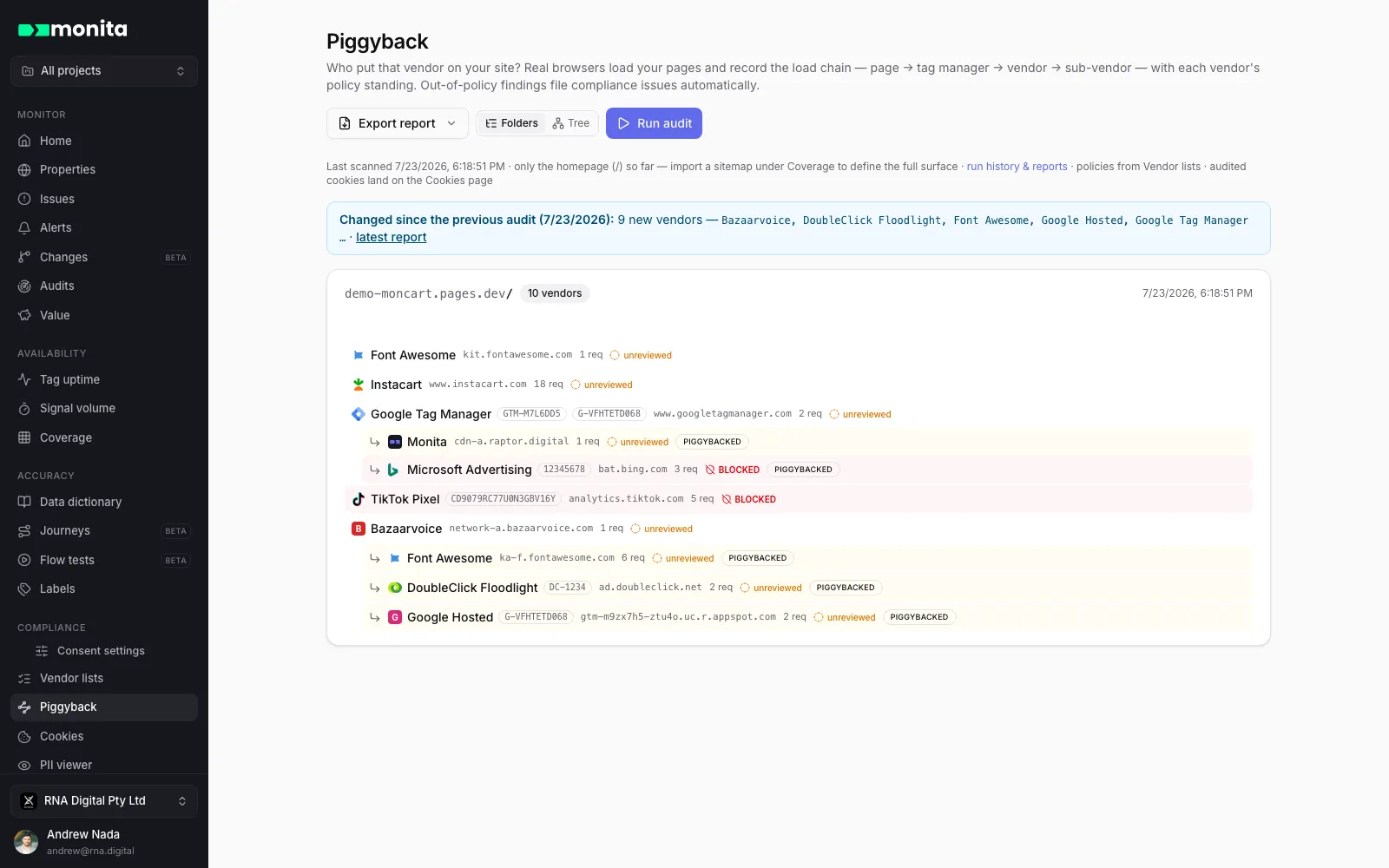
Two readings of the same data:
- Folders — indented rows, dense, scan-down-the-page.
- Tree — a left-to-right cascade that draws the load chain as a picture.
How the two work together
Section titled “How the two work together”- Traffic flows; vendors appear on Vendor lists as unreviewed.
- You (or the team that owns the tag) mark each one approved or blocked.
- From then on, a blocked vendor firing anywhere — live traffic or an audit — is flagged, filed and routed through your alert rules.
- When something unexpected shows up, Piggyback tells you which script to remove, and from which container.